Getting Started with RXPS
Welcome to RXPS! This guide will walk you through everything you need to start playing.
Downloading the Client
- Visit the official website: rxps.io
- Download the RXPS launcher for your operating system
- Run the installer and follow the prompts
- Launch the client
Creating Your Account
- Visit the official registration page: Create Account
- Fill in your desired information
Once registered, you can log into the game client and choose your game mode, XP rate, and begin your adventure!
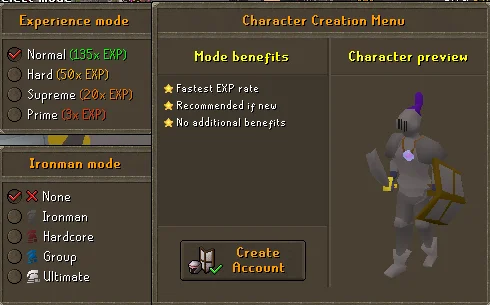
Choose your experience mode and ironman status
Choosing a Game Mode
Experience Modes
| Mode | XP Rate | Description |
|---|---|---|
| Normal | 135x | Fastest XP rate, recommended for new players |
| Hard | 50x | Balanced challenge |
| Supreme | 20x | For experienced players |
| Prime | 3x | Ultimate challenge |
Ironman Modes
| Mode | Description |
|---|---|
| None | Standard gameplay with trading enabled |
| Ironman | Self-sufficient - no trading with other players |
| Hardcore | One life - death converts you to regular Ironman |
| Group | Team-based ironman mode |
| Ultimate | No banking - live off what you carry |
Your First Steps
When you first log in, you'll be approached by Adventurer Jack who will help you get started.
The Adventure Book
Adventurer Jack will introduce you to the Adventure Book - your guide to progressing through RXPS.
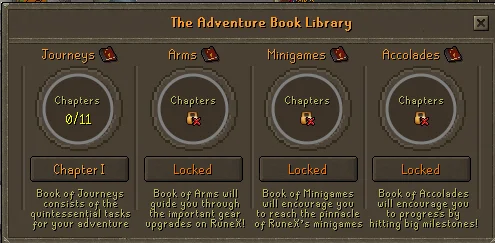
The Adventure Book tracks your progression
The Adventure Book contains:
- Journeys - Quintessential tasks for your adventure
- Arms - Guides you through important gear upgrades
- Minigames - Encourages you to explore RXPS minigames
- Accolades - Milestones and achievements to work toward
Starter Equipment
You'll receive basic equipment for all combat styles:
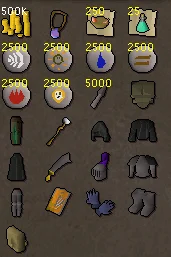
Your starting gear
- Basic Melee equipment
- Basic Ranged equipment
- Basic Magic equipment
- A special Amulet that upgrades your gear as you progress
Essential Commands
Here are some commands you'll use frequently:
::home        - Teleport to home area
::shops       - Open the shops interface
::vote        - Open voting page (Remember to do so every 12 hours!)
::discord     - Join the Discord server
See Commands for a complete list.
Tips for New Players
Daily Activities
Make sure to complete daily activities for bonus rewards and progression!
- Ask for help - The community is friendly, don't be afraid to ask questions
- Join Discord - Stay updated on events and connect with other players
- Vote daily - Voting gives rewards and helps the server grow
- Follow the Adventure Book - It guides you through progression
- Take your time - There's a lot of content, enjoy the journey!
Next Steps
- Commands - Learn all the useful commands
- Bosses Overview - Learn about PvM content
- Achievements - Track your progress